
Hello and welcome to CloudBreach's first blog post on "Introduction to AWS Enumeration" with a special emphasis on the security aspects. In the dynamic realm of cloud security, the paramount first step of any offensive security engagement is undoubtedly enumeration. This methodical process of gathering comprehensive information about target systems is not just a preliminary step; it is the cornerstone upon which successful security engagements are built. Even in the intricate and expansive cloud environments, the principle of 'Enumeration First' holds its ground as the key to unveiling the concealed vulnerabilities and potential attack vectors.
Our short blog delves deep into unlocking the secrets of unauthenticated AWS S3 enumeration through the lens of a potential adversary. Upcoming blog posts will explore the security dimensions of other AWS services.
What is Amazon S3?
Amazon Simple Storage Service (Amazon S3) is a scalable object storage service provided by Amazon Web Services (AWS). It is designed to store and retrieve any amount of data from anywhere on the web.
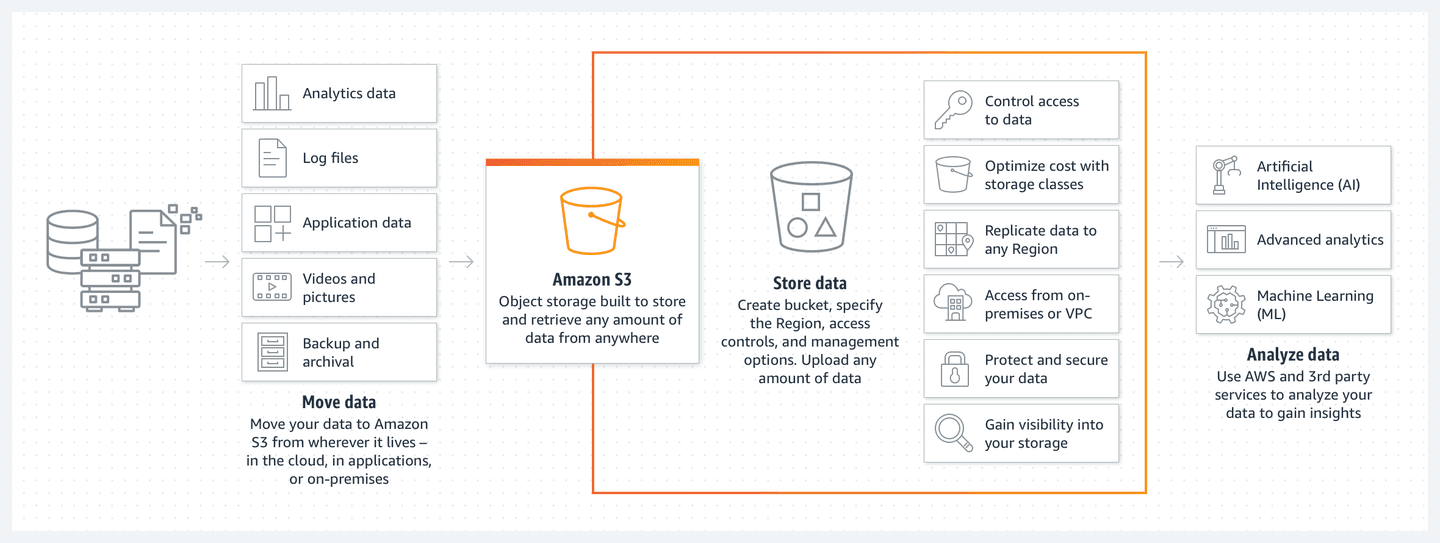
In the context of AWS enumeration, particularly when discussing Amazon S3, there are two main types of enumeration: unauthenticated and authenticated. Each type has its own methodologies, tools, and limitations. In this article, we will focus on the security standpoint.
Open Source Intelligence (OSINT)
In this process we use various search engines to perform OSINT and get information about AWS Access & Secret Keys that are leaked and AWS S3 bucket names that are cached by crawlers.
Google Dorks
The below Google dorks can be used to extract information related to AWS S3:
site:.s3.amazonaws.com "Company"
site:s3.amazonaws.com intitle:index.of.bucket ""
site:s3.amazonaws.com "index of /" s3
site:amazonaws.com filetype:xls password
inurl:gitlab "AWS_SECRET_KEY"
inurl:pastebin "AWS_ACCESS_KEY"
inurl:s3.amazonaws.com intitle:"AWS S3 Explorer"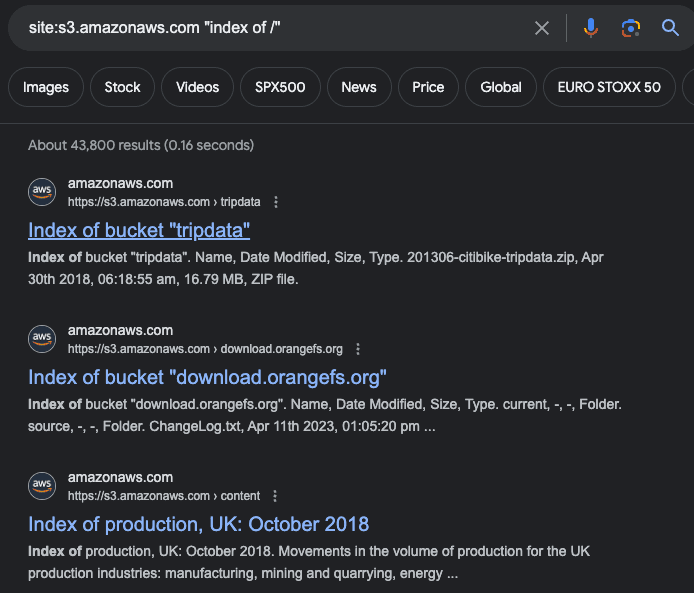
site:s3.amazonaws.com "index of /" surfaces publicly listed buckets.More Google dorks can be found by doing a quick search on the Google Hacking Database with an appropriate keyword.
GitHub Dorks
These are some of the hand-picked GitHub dorks to enumerate AWS S3 buckets, secret keys, and access keys:
amazon_secret_access_key
amazonaws
aws_access
aws_access_key_id
aws_bucket aws_key
aws_secret
aws_secret_key
aws_token
bucket_password
bucketeer_aws_access_key_id
bucketeer_aws_secret_access_key
cache_s3_secret_key
cloud_watch_aws_access_key
filename:credentials aws_access_key_id
filename:s3cfg
lottie_s3_api_key
lottie_s3_secret_key
rds.amazonaws.com password
s3_access_key
s3_access_key_id
s3_key s3_key_app_logs
s3_key_assets
s3_secret_key
sandbox_aws_access_key_id
sandbox_aws_secret_access_key
secret_key
eureka.aws
secretkey
filename:.bash_profile aws
filename:.s3cfg
The process of searching manually for each keyword can be automated using GitDorker as shown below:
python3 GitDorker.py -tf tokenfile.txt -d aws-dorks.txt -e 1 -p -q "@amazon.com"Shodan Query
According to Shodan, the data displayed is from the past 30 days of monitored data on the internet.
html:"AWS_ACCESS_KEY_ID"
html:"AWS_SECRET_ACCESS_KEY"
html:"AWS_SESSION_TOKEN"
title:"AWS S3 Explorer"
html:"AWS Elastic Beanstalk overview"
html:"OpenSearch Dashboards"
"X-Amz-Server-Side-Encryption"
title:"EC2 Instance Information"
http.title:"Amazon Cognito Developer Authentication Sample"
"Server: EC2ws"
title:"AWS X-Ray Sample Application"
html:"Amazon EC2 Status"
html:"AWS EC2 Auto Scaling Lab"
html:"ListBucketResult"
FOFA Query
FOFA is a search engine for mapping cyberspace, aimed at helping users search for internet assets on the public network.
app="amazon-AWS-ELB"
app="amazon-AWS-Elastic-Beanstalk"
app="amazon-AWS-EC2"
app="amazon-AWS-WAF"
body="AWS_ACCESS_KEY_ID"
body="AWS_SECRET_ACCESS_KEY"
body="AWS_SESSION_TOKEN"
app="amazon-ECS"
app="amazon-AmazonS3"
body="ListBucketResult"
Detecting Amazon Services with BuiltWith
BuiltWith tracks over 2,500 eCommerce technologies across more than 26 million eCommerce websites. You can search for other Amazon Web Services technologies from the search tab with "Amazon" as a keyword.
Wappalyzer
Wappalyzer is a cloud technology profiler tool that analyzes the technology utilised by a web application. The company has also launched a Chrome extension for more flexibility, the Wappalyzer Extension.
AWS S3 Bucket Listing
S3 bucket listing refers to the ability to view and retrieve a list of files stored in an Amazon S3 bucket, providing essential insights into the contents and facilitating efficient data management. It enables users to navigate and understand the objects present within the bucket.
Using uncover with Nuclei
uncover -q 'html:"ListBucketResult"' -silent | httpx -silent | nuclei -id aws-object-listing -vvuncoveris a Go wrapper using the APIs of well-known search engines to quickly discover exposed hosts on the internet.httpxis a fast and multi-purpose HTTP toolkit that allows running multiple probes using the retryable HTTP library.nucleiis a fast, template-based vulnerability scanner focused on security testing. It's primarily used for web security testing, however it can be adapted for various types of enumeration, including AWS enumeration. It's important to note that Nuclei is not inherently designed for cloud-specific enumeration like AWS S3 buckets.
Get all the available hosts from the internet using uncover, check whether they have an HTTP or HTTPS URL scheme using httpx, and then scan them using the nuclei engine with the aws-object-listing template. As a result, you will get the details of the Amazon (AWS) S3 buckets.
GrayHatWarfare
GrayHatWarfare allows users to find open buckets.
Conclusion
It's crucial for individuals and organizations to prioritize the security of their AWS S3 buckets. Unauthenticated enumeration poses significant risks, potentially exposing sensitive data and leaving systems vulnerable to unauthorized access.
As we've explored various simple techniques and tips to map the attack surface of your organization, it's essential to emphasize that continuous testing and review of AWS services is required. Most companies lack the cloud expertise and knowledge required to maintain cloud infrastructure, making them prone to misconfigurations that can lead to data breaches.
Boost your cloud security skills and learn about the latest cloud offensive techniques by enrolling in the Breaching AWS course. The hands-on labs provide the perfect training platform to test your tools and knowledge. Take the challenge and earn the OAWSP badge to showcase your AWS security proficiency. Stay ahead in safeguarding cloud environments against evolving threats.