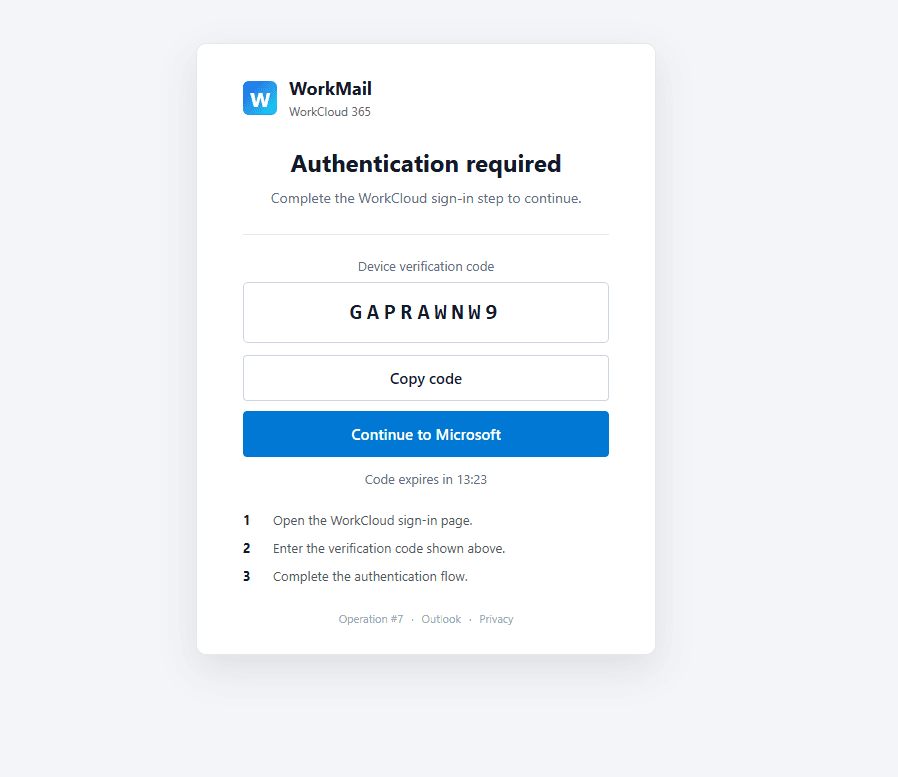
Over the past year, device code phishing has moved from a relatively niche technique to a widely used way of targeting Microsoft 365 accounts. It doesn't steal a password. It doesn't put up a fake login page. The victim signs in on the real Microsoft page, approves a real MFA prompt, and hands the attacker a live session. From Entra ID's side, the sign-in looks clean, which is why a lot of the usual controls and a lot of user training miss it.
A number of recent campaigns go further than token theft. In some attack paths, abuse of the right first-party client can provide a route from a successful device-code authentication to device registration and, in documented cases, a Primary Refresh Token. This post covers how the flow works, why the Microsoft Authentication Broker client matters, what to hunt for, and what actually stops it. At the end we cover AuthStrike, a tool we built to reproduce the whole chain safely in a test tenant.
How the device code flow works
The device code flow (OAuth 2.0 device authorization grant, RFC 8628) exists for devices that can't show a browser: smart TVs, CLI tools, IoT gear, printers. The steps are simple:
- A client asks Entra ID for a device code, naming the resource and scopes it wants.
- Entra returns a short user code, a verification URL (
microsoft.com/devicelogin), and roughly a 15-minute window. - The client shows the code and URL to the user.
- The user opens the URL on another device, enters the code, signs in, and consents.
- The client polls the token endpoint with the device code.
- Once sign-in completes, Entra hands the client an access token and a refresh token.
The gap the attacker uses is that nothing ties the person who displays the code to the person who enters it. If the attacker starts the flow and gets a victim to type the attacker's code into the real Microsoft page, Entra issues the tokens to the attacker. The victim's experience is a normal, successful sign-in.
The client IDs and FOCI
The attacker picks which first-party application to request tokens for, and that choice decides what the tokens are good for. The ones that show up most often in these attacks:
| Application | Client ID |
|---|---|
| Microsoft Office | d3590ed6-52b3-4102-aeff-aad2292ab01c |
| Azure CLI | 04b07795-8ddb-461a-bbee-02f9e1bf7b46 |
| Azure PowerShell | 1950a258-227b-4e31-a9cf-717495945fc2 |
| Microsoft Authentication Broker | 29d9ed98-a469-4536-ade2-f981bc1d605e |
Outlook, Teams, and OneDrive are other first-party apps attackers target depending on what they're after. Many of these clients belong to the Family of Client IDs (FOCI). Depending on the client and authorization context, refresh-token reuse across FOCI family members can extend access to additional Microsoft services, including Microsoft Graph, Exchange Online, and SharePoint. Access tokens are short-lived, while refresh tokens are longer-lived and can be used to obtain new access tokens without repeating the full interactive sign-in each time.
Why the Authentication Broker changes the game
Most reporting focuses on the stolen session. The Microsoft Authentication Broker client is particularly important because recent campaigns have used it in attack paths that continue into device registration.
When the attacker requests a device code for the Authentication Broker client, the resulting authentication state can be used in a documented attack path to obtain access to the device registration service and register an attacker-controlled device in the victim's Entra ID tenant. In documented cases, the new device identity is then used to obtain a Primary Refresh Token (PRT). A PRT is associated with a joined device and supports single sign-on across Microsoft services.
Microsoft documented this technique in its reporting on Storm-2372 in February 2025, describing the use of the Authentication Broker client in a device registration and PRT acquisition path. (Microsoft has since assessed Storm-2372 as an initial access sub-cluster of Midnight Blizzard.) The mechanics, documented by several teams since, run roughly like this: the Authentication Broker refresh token is swapped for a token scoped to the device registration service, that token registers a device and gets back a device certificate, and the certificate is then used to request the PRT. No extra consent prompt fires at any step.
This is an important point for incident response: the registered device is a separate object in Entra ID. Password resets and session revocation should not be treated as sufficient containment on their own. Investigate newly registered devices and remove any device that was not legitimately enrolled as part of the incident.
What it looks like in the wild
This isn't lab-only. Device code phishing is now packaged and sold. Kits like Kali365 (also sold as Octopi365 and Freedom365), Forg365, EvilTokens, and Tycoon 2FA ship prebuilt lures, real-time token capture, and post-compromise tooling on a subscription. The lures cover the usual set: shared documents, payment reminders, Teams invites, DocuSign and Adobe themes, MFA and password-reset notices, often localized and written with AI help. Delivery hides behind trusted services (Webflow, Canva, Google infrastructure) and CAPTCHA gates to keep scanners out. The common thread in current kits is a backend that requests and polls Microsoft Authentication Broker device codes, then drives device registration once the victim approves.
What to hunt for
Legitimate device code sign-ins are rare in most tenants, which makes them a good thing to baseline and watch.
- Sign-ins where the authentication protocol is Device Code. List them all first; the volume should be low and explainable.
- A location or ASN split: the victim completes the sign-in from one IP, and the token is used almost immediately from a different IP or hosting-provider ASN.
- Device code sign-ins to high-value first-party clients (Office, Azure CLI, Azure PowerShell, Authentication Broker) that don't normally drive this flow in your environment.
- An Authentication Broker sign-in followed by access to the device registration service. There's no normal user reason for that pairing.
- A new device registration shortly after a device code sign-in, especially from unfamiliar infrastructure.
- Device name and User-Agent anomalies. Older tooling used names like
DESKTOP-XXXXXXXXandDsregUser-Agents; newer activity uses plain names likeWork PCand HTTP-client User-Agents such asnode,axios, orundici. Baseline against your own naming convention rather than a fixed string. - A device code sign-in followed by an inbox rule change within the hour. That's a classic BEC follow-on and a high-fidelity pairing.
Mitigations
The main controls are structural: remove device-code flow where it is not needed, restrict access to managed devices where appropriate, and reduce the value of stolen authentication state.
- Block the device code flow with Conditional Access. Microsoft recommends blocking device code flow wherever possible. Start by reviewing current device-code usage in report-only mode, then block it for users and scenarios that do not need it. Keep narrowly scoped exceptions only for documented use cases.
- Require managed or compliant devices. Use Conditional Access to require an appropriately managed or compliant device for sensitive cloud access where practical. This can reduce the value of authentication obtained from an attacker-controlled unmanaged device.
- Use phishing-resistant authentication. FIDO2 security keys and passkeys are important identity controls, but they should complement device-code blocking rather than replace it. In a device-code phishing attack, the victim can still complete a legitimate Microsoft authentication flow and unintentionally authorize the attacker's session.
- Train users for this specific case. The Microsoft sign-in page may be completely legitimate. The useful user guidance is simple: do not enter a device code on a Microsoft page unless you personally started that sign-in on the device in front of you.
For containment, investigate and remove any attacker-registered devices, then revoke sign-in sessions and reset credentials as appropriate. Also check the mailbox for rogue inbox rules or forwarding and review OAuth grants. Device removal should be part of the containment process when device registration abuse is suspected.
Reproducing the attack safely: AuthStrike
Reading about the chain is one thing. Confirming that your Conditional Access policies and detections actually catch it is another. We built AuthStrike to reproduce the relevant authentication and device-registration paths against a dedicated test tenant, for authorized assessments and training only.
What it does:
- Runs device code authentication against a Microsoft first-party client you select, then captures and monitors the resulting authentication state from an operator portal.
- Inspects captured tokens from a server-side MSAL cache, with raw token persistence off by default.
- Recovers accounts from successful operations and shows the Microsoft Graph
/meprofile. - Validates Graph and Outlook access, including a mailbox view for the authorized test account.
- Tests silent token acquisition and refresh, including FOCI cross-client behavior.
- Tests device registration against eligible Microsoft Authentication Broker operations and provides the supported ROADtools commands for the lab workflow.
- Reviews read-only Azure CLI and PowerShell commands for Entra users and groups.
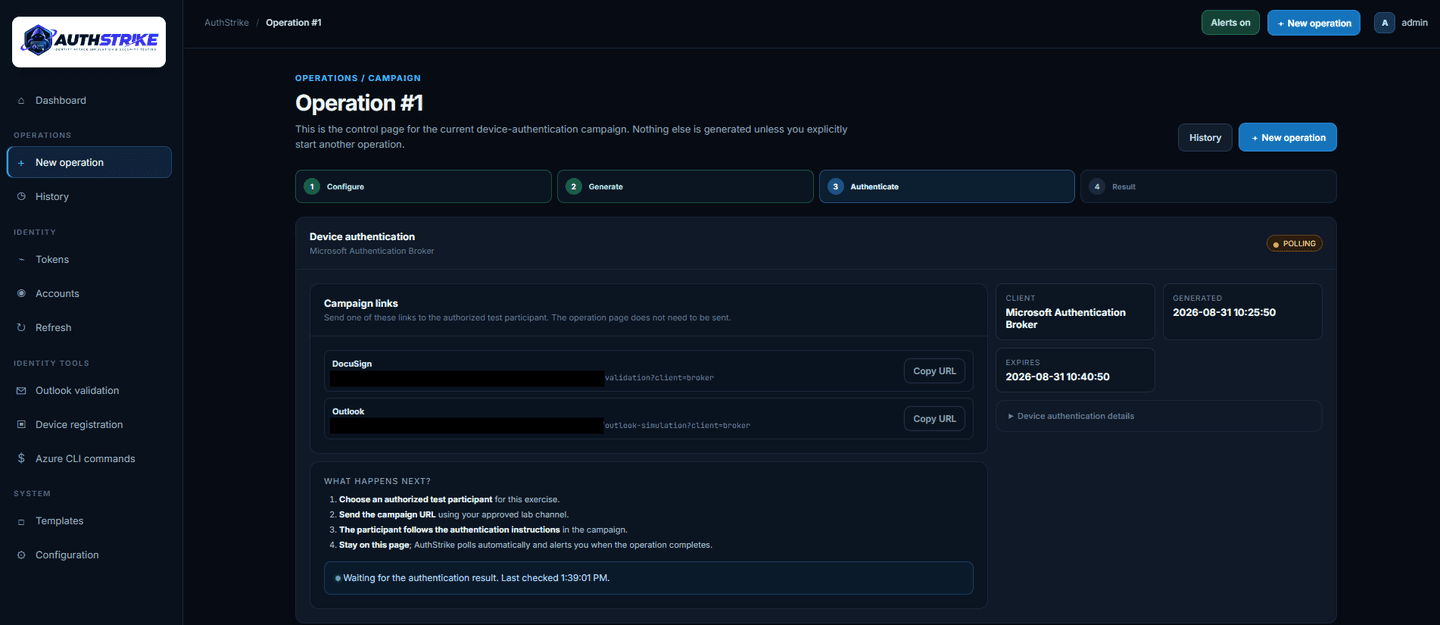
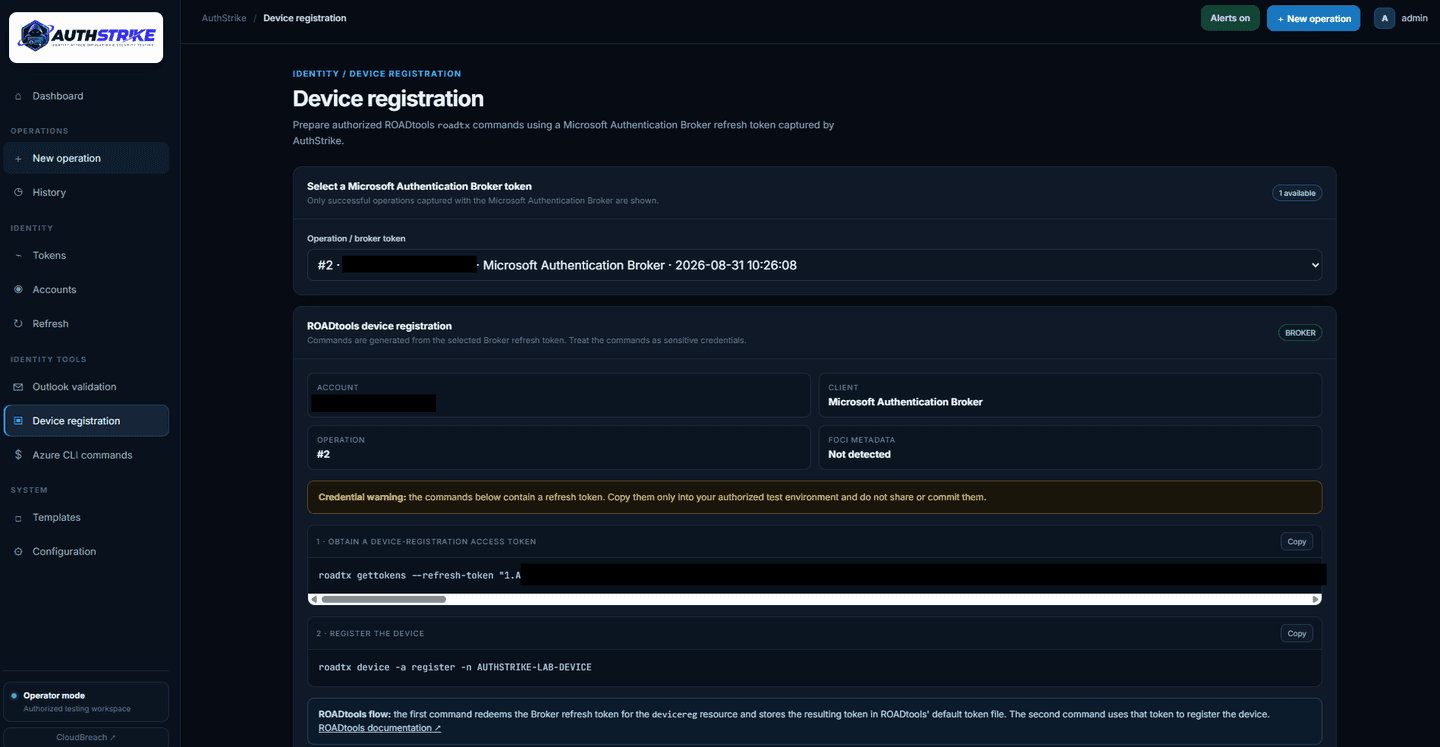
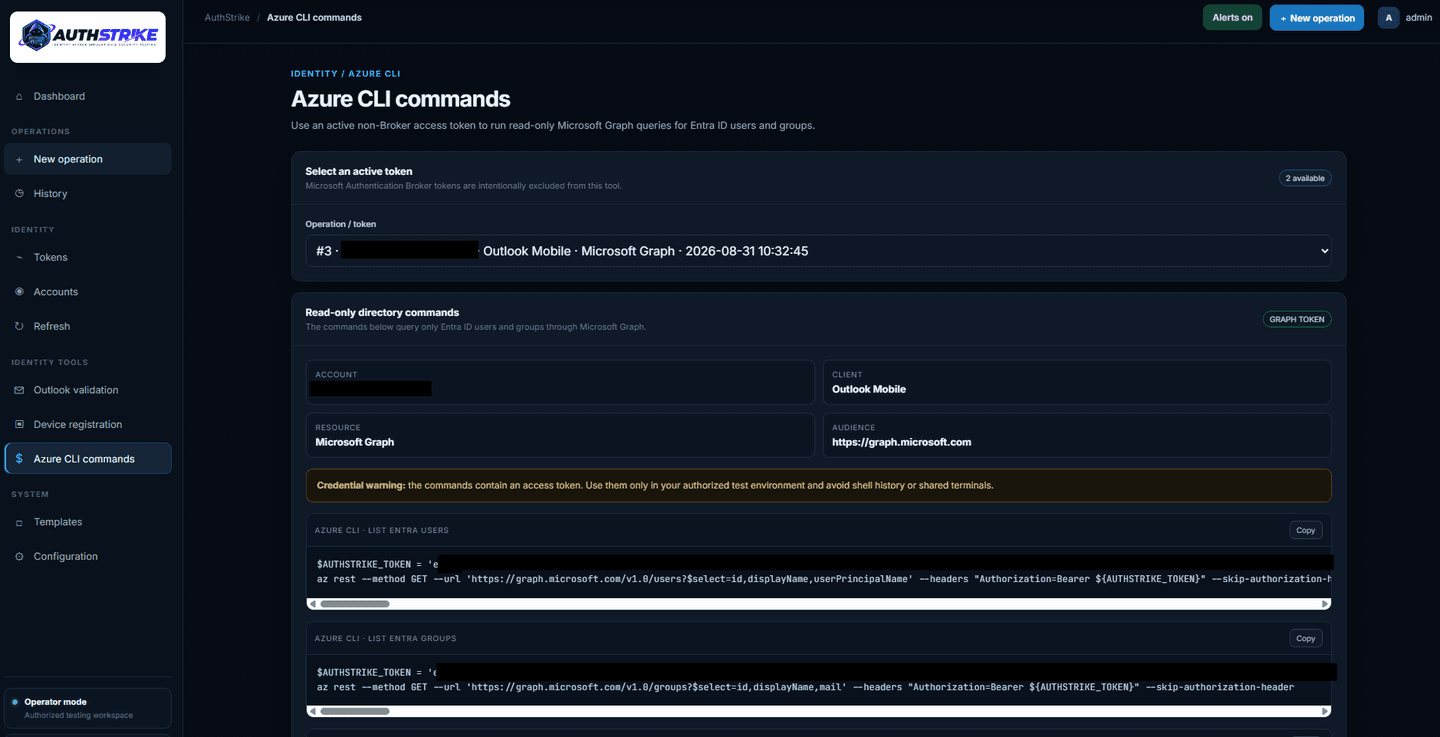
AuthStrike is for environments and accounts you're authorized to test. Use a dedicated test tenant and test users, run it over HTTPS, and treat any captured tokens, caches, and mailbox data as sensitive.
Get AuthStrike: github.com/cloudbreach/AuthStrike (open source, GPLv3). Full setup and usage instructions are in the repository.
References
- Microsoft Security: Storm-2372 conducts device code phishing campaign.
- Microsoft Security: Inside an AI-enabled device code phishing campaign.
- TrustedSec: The New Hotness in Phishing: Device Code Attacks in M365.
- Elastic Security Labs: Detecting Tycoon 2FA AiTM attacks across Entra ID and Google Workspace.
- Wiz: How to Spot and Stop Rogue Device Joins (Entra device registration abuse).
- Nicola Suter: Anatomy of a device code phishing campaign.
- The Hacker News: Forg365 PhaaS Targets Microsoft 365 with Device Code and AitM Session Theft.
- Push Security: Analyzing the rise in device code phishing attacks.
- Trend Micro: Device Code Phishing: Turning a Convenience Feature Into an MFA Bypass.
- Microsoft Learn: Block authentication flows with Conditional Access policy.
Want to build these skills against live, isolated environments? Explore the Breaching Azure and Breaching Azure Advanced courses.