Every developer machine is a graveyard of forgotten secrets. API keys committed years ago, AWS credentials left in a terminal session, SSH keys copied across projects, .env files scattered across dozens of repositories. Each one feels non-urgent in isolation. Collectively, they represent a significant and compounding risk.
EnvWatch is a lightweight command-line tool that answers a simple question: what sensitive data currently exists on this machine?
The 2024 AWS .env Campaign
In 2024, Palo Alto Networks' Unit 42 documented a large-scale extortion campaign built entirely on exposed environment files. Attackers scanned over 230 million targets and harvested:
- 1,185 AWS access keys
- 333 PayPal OAuth tokens
- 235 GitHub tokens
- Slack webhooks, DigitalOcean credentials, and more
The attackers didn't stop at collection. They used the harvested AWS credentials to create IAM roles and Lambda functions, turning compromised infrastructure into attack platforms for the next wave of victims. The entry point in every case: a .env file left accessible on a public-facing server.
The Problem: Secret Sprawl
Developer machines accumulate sensitive data across multiple vectors simultaneously: active environment variables set in shell profiles, leftover .env files in old project directories, AWS credential files that were never rotated, private keys generated for one purpose and forgotten.
The problem isn't any single secret, it's the loss of visibility over where secrets exist. Without that visibility, credential rotation is incomplete, risk assessment is guesswork, and breach prevention is reactive.
How EnvWatch Scans
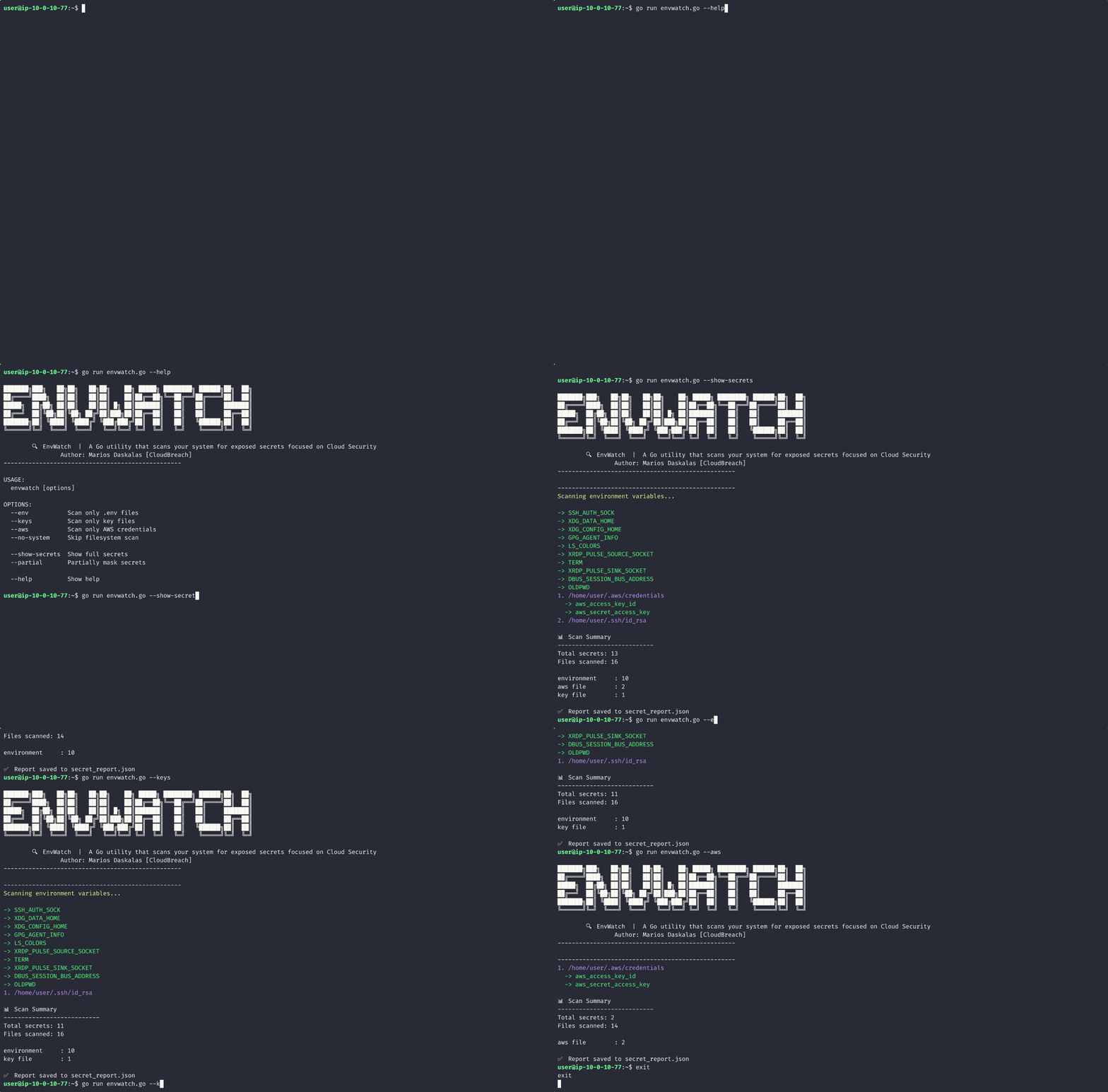
EnvWatch uses five detection layers:
Environment Variable Scanning
Checks active environment variables against keyword lists (PASSWORD, SECRET, TOKEN, API_KEY, etc.) and analyzes value entropy to surface high-confidence hits.
.env File Discovery
Recursively walks home directories, parses environment files line-by-line, ignores comments, and extracts KEY=VALUE pairs from any file matching .env patterns.
Private Key Detection
Scans for .pem and .key files across the filesystem and explicitly walks ~/.ssh directories where forgotten keys accumulate.
AWS Credential Scanning
Explicitly checks ~/.aws/credentials and ~/.aws/config, parsing by section with contextualized output showing which profile each credential belongs to.
System-Wide Scanning
Optional filesystem-wide scan configurable with flags. Off by default to keep runtime fast; useful for thorough audits before machine decommission.
Output & Safety
By default, EnvWatch redacts secret values. You opt in to more visibility with explicit flags:
--partial, masked output inabc…xyzformat--show-secrets, full plaintext output
Results are written both as human-readable terminal output and as a machine-friendly secret_report.json file, suitable for CI pipeline integration.
CLI Reference
# Run a full scan
$ envwatch
# Scan specific targets
$ envwatch --env # .env files only
$ envwatch --keys # Private key files only
$ envwatch --aws # AWS credentials only
$ envwatch --no-system # Skip filesystem scan
# Control output verbosity
$ envwatch --partial # Show abc…xyz masked values
$ envwatch --show-secrets # Show full plaintext values
Strengths & Limitations
Strengths
- Fast and lightweight
- Zero external dependencies
- Works fully offline
- Auditable codebase
- No configuration files required
Limitations
- Heuristic detection may produce false positives
- Incomplete coverage by design
- No context awareness (test vs. production keys)
- Not a replacement for Vault or secret managers
When to Use It
- Pre-commit verification before pushing to a shared repository
- Local security audit during routine hygiene reviews
- Sweep before sharing or decommissioning a development machine
- Lightweight CI step in developer-owned pipelines
EnvWatch is a visibility layer, not a secrets management platform. The output tells you what exists, acting on it (rotating, revoking, migrating to a secrets manager) is still on you.
What's Coming
Planned additions to EnvWatch include:
- Git history scanning for secrets committed and later removed
- Docker and container image inspection
- Secret rotation API integration
- Risk scoring based on secret type and exposure context
- Enhanced pattern recognition for additional credential formats
Conclusion
The Unit 42 campaign wasn't sophisticated. It was automated, opportunistic, and effective precisely because exposed secrets are common. EnvWatch won't solve secret sprawl, but it gives you an answer to the question every developer should be asking more often: what sensitive data is sitting on this machine right now?
The Go implementation (EnvWatch) and the shell-based alternative (SlWatch) are available on GitHub. Both are zero-dependency and auditable.
Understanding how credentials are exposed is foundational to attacking cloud environments. The Breaching AWS and Breaching Azure courses cover how attackers find, validate, and weaponize credentials from exposed sources in real lab environments.