There’s a quiet risk that creeps into every developer’s workflow; not flashy, not obvious, but persistent. It’s the slow accumulation of secrets: API keys copied during testing, forgotten .env files, SSH keys scattered across directories, AWS credentials still valid but long ignored. None of it feels urgent in the moment. Collectively, it creates an attack surface that’s hard to reason about.
The 2024 AWS .env Extortion Campaign
In 2024, Palo Alto Networks’ Unit 42 uncovered a large-scale extortion campaign built entirely around one thing: exposed .env files. Attackers ran automated scans across 230 million unique targets, harvesting credentials stored in publicly accessible environment files. The haul included 1,185 AWS access keys, 333 PayPal OAuth tokens, 235 GitHub tokens, and dozens of Slack webhooks and DigitalOcean tokens all extracted from files that developers had left reachable on misconfigured web servers.
Once inside a victim’s AWS environment, attackers escalated privileges by creating new IAM roles with administrator permissions, then spun up Lambda functions to automate further scanning turning each victim’s own infrastructure into attack infrastructure for the next wave.
No sophisticated exploit. Three compounding failures: secrets stored in .env files, those files publicly accessible, and long-lived credentials with no rotation policy.
EnvWatch was built to address exactly that. It’s a lightweight Go utility that scans your system for exposed cloud secrets fast, local, and deliberately simple
The Problem: Secret Sprawl Is Inevitable
If you develop long enough, your machine becomes a graveyard of sensitive data. A typical setup might include:
- Multiple cloned repositories (each with its own .env)
- Cloud credentials for different accounts
- Temporary tokens that became permanent by accident
- Private keys for servers you no longer use
The real issue isn’t just that secrets exist, it’s that you lose track of where they are and once that happens:
- Rotating credentials becomes harder
- Risk assessment becomes guesswork
- Leaks become more likely
EnvWatch doesn’t try to solve everything. It answers one critical question: “What sensitive data is currently sitting on this machine?”
How EnvWatch Works
EnvWatch takes a multi-layered approach. Instead of relying on a single detection strategy, it combines pattern matching, heuristics, and targeted file scanning. Here’s how each layer works.

1. Environment Variable Scanning
It starts with your active environment iterating through os.Environ() and splitting each entry into key/value pairs.
✅ Keyword-based detection
It checks variable names against a predefined list:
- PASSWORD
- SECRET
- TOKEN
- API_KEY
- PRIVATE_KEY
- AWS_SECRET
- DB_PASSWORD
This catches the obvious cases:
✅ Heuristic detection (entropy)
Not all secrets are labeled clearly. So EnvWatch also analyzes the value itself using entropy.
2. .env File Discovery
EnvWatch walks your home directory recursively using filepath.Walk(root, …), targeting *.env files. Each file is parsed line-by-line:
- Ignores comments (#)
- Skips malformed lines
- Extracts KEY=VALUE pairs and flags anything that matches known patterns
Only relevant lines are surfaced, no noise, no full file dumps.
Example:
3. Private Key Detection
EnvWatch scans for .pem and .key files, plus anything inside ~/.ssh. Rather than complex parsing, it uses a focused check:
- .pem
- .key
- Anything inside ~/.ssh
This is enough to catch RSA private keys, OpenSSH keys, and PEM-encoded credentials.
4. AWS Credential Scanning
Cloud credentials are high-risk and routinely overlooked. EnvWatch explicitly checks ~/.aws/credentials and ~/.aws/config, parsing them by section:
Output is contextualized — for example, -> [default]:aws_secret_access_key — making it easy to trace exactly where a secret lives.
5. System-Wide Scan (Optional but Powerful)
By default, EnvWatch scans your home directory, projects, Downloads, random config folders. You can narrow scope with flags:
You can disable it with:
Safe Output: No Accidental Leaks
Security tools shouldn’t create new problems. By default, EnvWatch redacts all values. You opt into visibility:
Partial masking
–partial
Output:
abc…xyz
Full visibility (use carefully)
–show-secrets
Output and Reporting
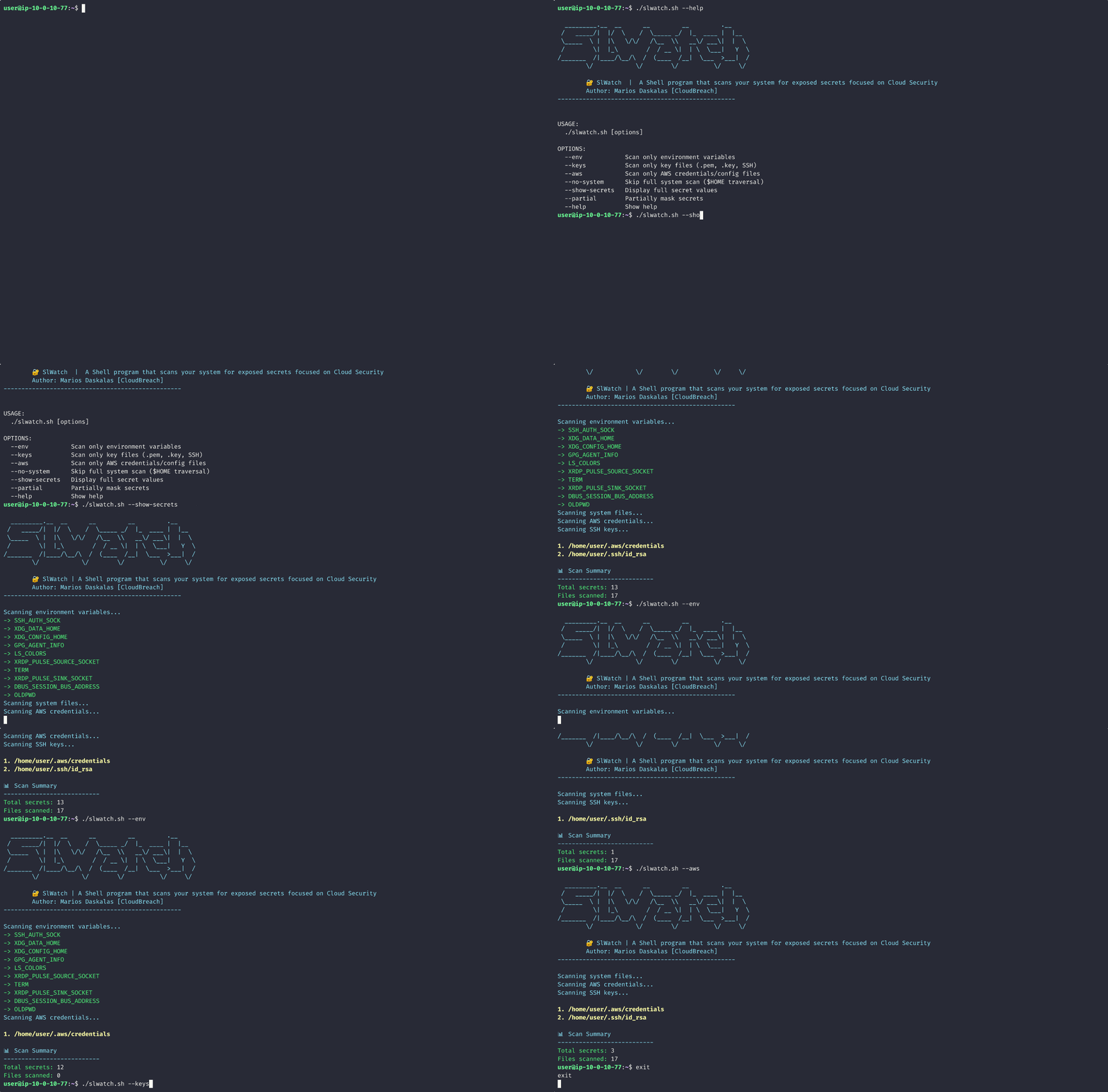
Terminal Output (Human-Friendly)
Color-coded, grouped by file, minimal noise:
JSON Report (Machine-Friendly)
Results are written to secret_report.json with a structure built for scripting and CI pipelines:
This makes it straightforward to feed results into scripts, use in CI pipelines, or track changes over time.
CLI Design Philosophy
EnvWatch keeps flags minimal and composable. No config files. No setup. Just run it:
Tradeoffs and Limitations
It’s important to be honest about what this tool is and what it isn’t.
✅ Strengths
- Fast and lightweight
- Zero dependencies
- Works offline
- Easy to audit (small codebase)
⚠️ Limitations
- Heuristic-based — may produce false positives
- Not exhaustive — may miss edge cases
- No context awareness — can’t distinguish test keys from production keys
Where EnvWatch Fits
Think of it as:
- A pre-commit sanity check
- A local audit tool
- A quick security sweep before sharing your machine
- A lightweight CI step
Ideas for Future Improvements
- 🔍 Git history scanning (detect committed secrets)
- 🐳 Docker/container inspection
- 🔗 Integration with secret rotation APIs
- 📉 Risk scoring (based on exposure + location)
- 🧠 Smarter pattern recognition (regex-based providers)
Final Thoughts
EnvWatch sits in a useful middle ground. It doesn’t try to be sophisticated and it doesn’t need to be. The Home Depot token and the AWS .env campaign both share the same root cause: credentials that nobody was watching. EnvWatch gives you a way to watch.
Run it once. You might be surprised what turns up.
If you want to use or contribute to the project, please visit the following link.
👉 https://github.com/cloudbreach/EnvWatch
An alternative version written in Shell is available as well! Please check it out! 🎉
Shell can run natively out of the box without any hussle or configurations. :)
👉 https://github.com/cloudbreach/SlWatch